


TL;DR - what happened
Shared ChatGPT chats are showing up in search engines, with no option to disallow search engine indexing. This is the equivalent of "anyone with the link" sharing settings in Google Docs/Sheets or Microsoft 365. No other service I’m aware of defaults to allowing data shared in this way to be indexed by search engines, so this news likely comes as a surprise to most ChatGPT customers.
TL;DR - how to quickly unshare your chats
Go to settings in ChatGPT
Go to Data Controls
Click the Manage button next to Shared Links
Delete away! (you can quickly delete all by using the 3-dot button in the upper right hand corner)
NOTE: For context, I have a ChatGPT Plus license, so my results here may not reflect Enterprise, Free, Edu, or other account types.
Why are indexable chat results a problem?
Historically, when you create a shared link in SaaS apps, search engine indexing is disabled. Over the past 10+ years, this has create a basic expectation of privacy when using these features. ChatGPT sessions can contain some very sensitive information, particularly now that it can be integrated with Dropbox, Google Drive, and other services that contain private/proprietary information.
Tech companies must manage user expectations and that means taking into account the current state of SaaS UI/UX, as that informs our expectations as consumers.
How are people finding these chats?
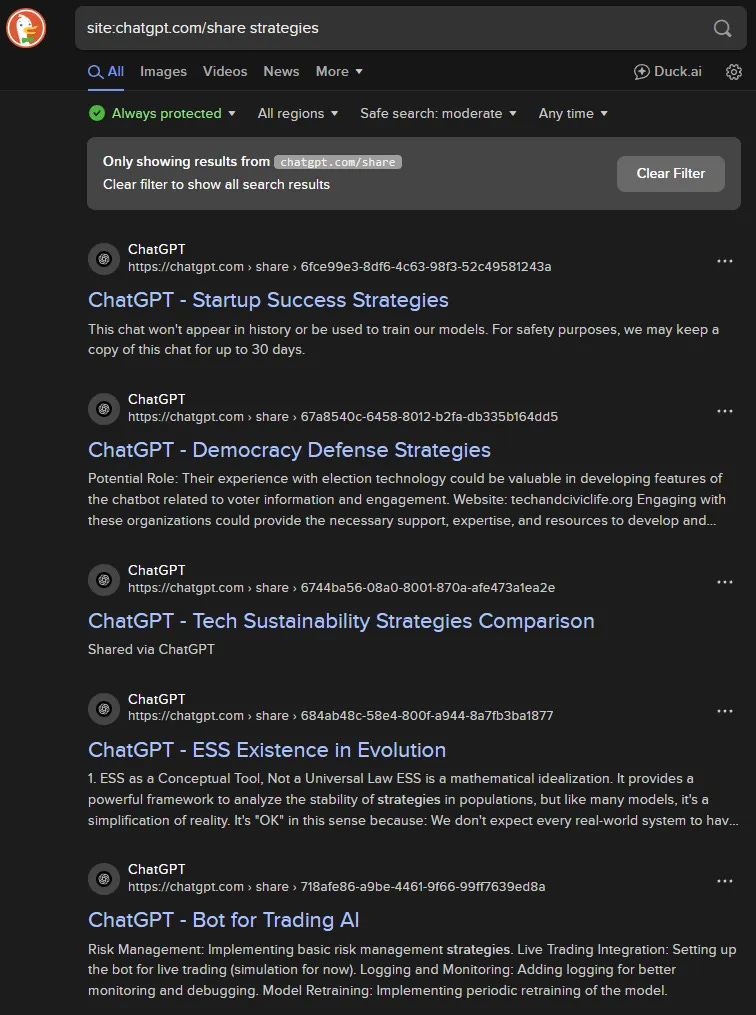
A basic site parameter search will find shared ChatGPT chats in most search engines. As of publishing, Google has stripped them out from their search results, but other search engines, like DuckDuckGo, still include them in search results.
How do shared links typically work?
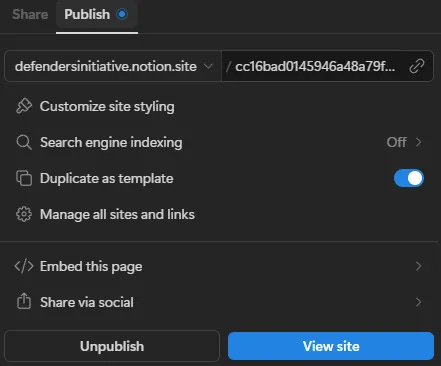
Despite the fact that anyone can see the data you've shared if they have the link, you can’t find shared Google Sheets or Google Docs in any search engine. Even Notion, which is often used as a quick/cheap way to stand up a website, defaults “Search Engine Indexing” to OFF.
The sharing function in most SaaS services create a link with a long, random value. This random value ensures the URL is not easily guessable and cannot be brute-forced. ChatGPT is no exception here and uses the typical structure of:
https:// chatgpt com/ share/ 688cef07-8cac-8004-a374-b87cfd6bdea4 (yes, this is a working link if you put it all together - it's just me researching used iPads, go nuts with it)
Google Drive does something similar, for comparison:
https:// docs google com/spreadsheets/d/ 1jptJ-dQvhVZBKWVkqOthgEd9suO-PRkCr1edSkD2K_o/This is typically a great balance of privacy vs accessibility, as clicking a link is as easy as it gets, and there is no simple path to discover the shared data without the link. This has worked well for other SaaS apps for over a decade.
How Does Sharing Work in ChatGPT?
Clicking the “Share” option in any chat will generate a link you can share.
Clicking it again will allow you to update the link.
There’s no easy way to tell if a chat is shared or not when looking at the chat.
There are no sharing options - it is simply public and indexable or not.
Archiving the chat does not change the sharing status.
Deleting the chat immediately removes the share, and results in the sharing link going to a 404
Let’s get rid of those unwanted shares!
As mentioned above, the process is pretty straightforward if you know where to look.
Go to settings in ChatGPT
Go to Data Controls
Click the Manage button next to Shared Links
Delete away! (you can quickly delete all by using the 3-dot button in the upper right hand corner)


Broken Processes and AI Opportunities
We’re still going to use ChatGPT and we still need a way to share results. Unfortunately, there isn’t a built-in export to PDF/markdown/etc option, but it still isn’t too inconvenient. I recommend using the copy-to-clipboard option, and then paste to Slack, Whatsapp, Signal, Google Doc, Email, or wherever else you might want to share your chat results.

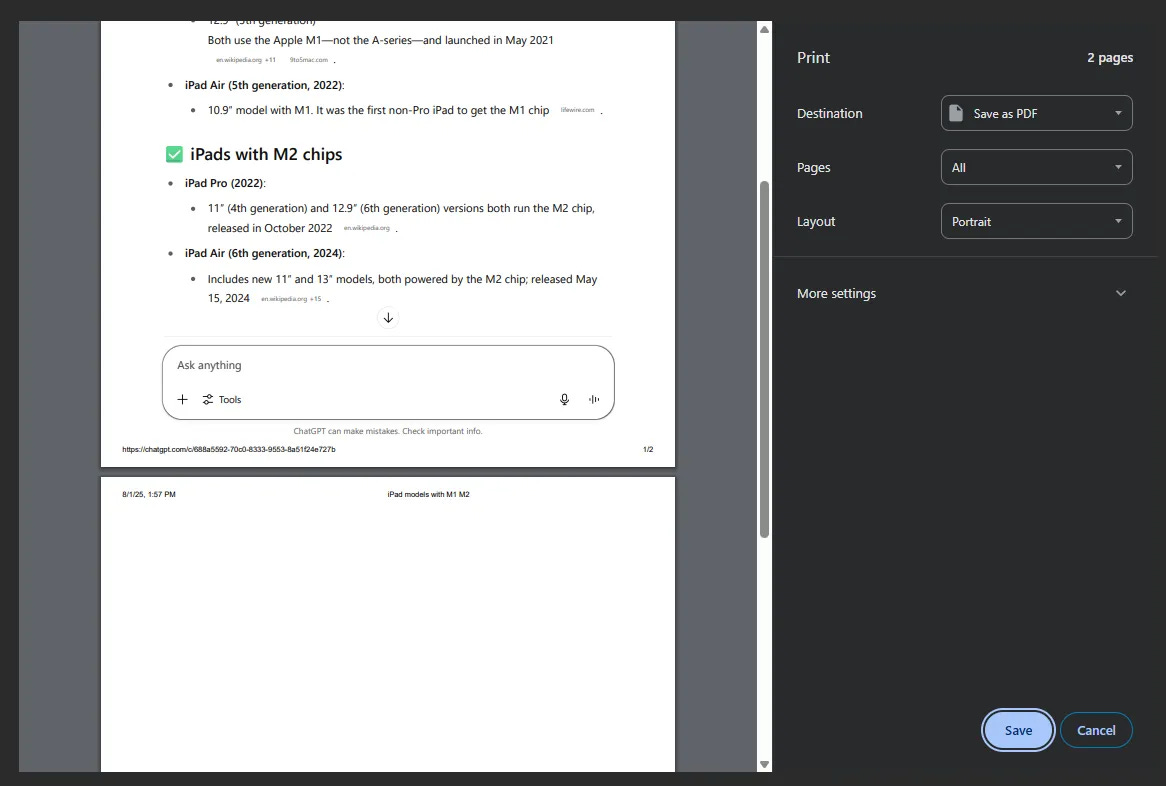
The massive downside here is that this approach will only copy a single response in the chat session, not the whole session. Once you get to 3+ prompts and responses, this approach isn’t ideal. I don’t have a good solution here - even the ancient approach of print-to-pdf fails to grab anything past the fold. Your experience may differ on other platforms. I’m using ChatGPT via the Arc Browser on Windows.
Could you copy and paste results output into a tool like Notion or a Google Doc, and use the better sharing features within those tools? Sure, but that’s getting REALLY inconvenient, especially when you consider that generative AI is now built into nearly all of these other tools, so why not skip ChatGPT and just generate content directly within these other applications?
I don’t often share ChatGPT results, and when I do, they’re a lot like this iPad research example - nothing I’d consider sensitive. For others, this could be a deal killer for their GenAI workflows and could hurt some of OpenAI’s business here. Tech companies can’t increasingly advertise AI as a productivity improvement and a time-saver and neglect UX and workflow. Most consumers won’t gravitate towards the best model, they’ll simply use whatever is built-in and most convenient.
Thanks to Alexandre Sieira for bringing this to my attention, along with Oliver Molander for sounding the alarm on LinkedIn.